

Safe Exam Browser
Restore Clipboard in SEB
How Hepi restores copy, paste, and Ctrl+C/V inside Safe Exam Browser sessions.
Why copy and paste stop working in SEB
Safe Exam Browser blocks clipboard access through three independent mechanisms: a timer that wipes copied content every 50ms, a shortcut blocker that intercepts Ctrl+C, Ctrl+V, and Ctrl+X, and — in isolated desktop sessions — a browser-level intercept that captures copy and paste events before they reach the system.
Hepi’s Restore Clipboard (Ctrl+C/V) feature disables all three, restoring normal copy and paste behavior without interrupting the SEB session.
What gets restored
| SEB mechanism | What SEB does | After Hepi disables it |
|---|---|---|
| Clipboard timer | Wipes copied content every 50ms | Disabled — copied content persists |
| Shortcut blocker | Blocks Ctrl+C / Ctrl+V / Ctrl+X | All shortcuts work normally |
| Browser intercept | Blocks copy/paste in isolated mode | Disabled — native copy/paste restored |
How to enable it
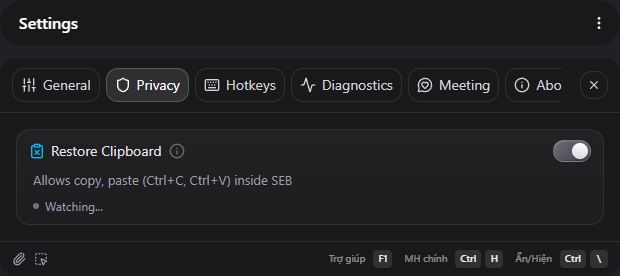
- Open Settings → Privacy → Safe Exam Browser.
- Toggle on Restore Clipboard (Ctrl+C/V).
- Start SEB. Hepi detects when SEB is fully loaded and applies the changes automatically.
SEB running modes
This feature works in both SEB running modes, but the browser intercept fix only applies when SEB creates a separate desktop environment.
- Normal desktop mode — the clipboard timer and shortcut blocker are disabled. Ctrl+C/V work immediately.
- Isolated desktop mode — all three mechanisms are disabled. Reload the page for the browser intercept fix to take effect.
See Understand SEB Running Modes for the difference between these modes.
Related pages
Last updated: 2026-05-17